So you may or may not know that I’ve got this Whole Home Audio system and networked surveillance system; both are combinations of off-the-shelf hardware and custom software. Together, they’ve been carrying the torch for my fledgling home automation aspirations.
A full-fledged home automation system can do all sorts of cool things – control lights, sprinklers, link to the alarm system, interface with voicemail, play mood music, etc. In general, you’re talking Entertainment/Convenience, Security, and Comfort.
I’ve finally added Comfort to the mix, by way of a WiFi-enabled thermostat.
I’ve had my eye on this category for some time, having read about X-10 and ZigBee and any number of other communication protocols. And while I may agree that a large abode can benefit greatly from complex automation, I always considered a smart thermostat to be the first order of business.
First, some clarification. I’ve been running programmable thermostats for years, as I’m sure most of you have. There are real energy savings to be found by setting your furnace to drop a few degrees at night or during the day when you’re not at home. And if you work a 9-5, then the thermostat’s schedule-based program is likely sufficient.
I do work a 9-5, but my weekend schedule is often up in the air, and there’s no real guarantee that my life will adhere to my thermostat’s schedule. If you happen to forget to hit the “away” button when you run to the mall, then the real answer is that your home is being heated unnecessarily until you get back. And if you err on the side of being miserly, then you may find yourself a little chilly (or hot) on the weekend because you forgot to set a comfortable temperature.
My forays into occupant awareness, then, were necessary prerequisites to a smart thermostat. The next prerequisite was cost, and Radio Thermostat Company of America has ticked that box with their US$99 CT-30 thermostat.
The thermostat connects to your home wifi network, just as your laptop would, and once connected it talks “to the cloud” so that you can access your thermostat using a web browser or smartphone app. This is great – but the real usefulness for me lies in the Application Programming Interface, which means that my custom-built home-automation system can talk to the thermostat.
As such, the thermostat’s typical 7-day/4-program schedule is set to maintain acceptable at-home temperatures, while the home-automation system – being occupant aware – can override the thermostat and set a lower (or higher) temperature when nobody is home.
So can I expect to save $99 on my gas/hydro bill with this solution vs. a typical programmable thermostat? Maybe. Does this solution check all of the right boxes as a hobby project with real-world usefulness? Most definitely 🙂
I’ve only recently finished the coding that controls the thermostat, so I’ll keep an eye on it over the next few days to see how it performs. After that I’ll add some logging (to see when the hvac system is actually on and for how long) as well as the requisite intranet webpages for feedback/control.
[update 2011/04/29] While I haven’t had any real problems with the thermostat and the home-automation integration, I decided rather quickly that it needed to be even smarter.
I’ve moved from a fixed “away” temperature to an offset method, where the system sets the “away” temp as an offset of the program temp. This is to handle the situation where the house is uncomfortably cold/hot when you arrive. Instead, it will now be about 2C off of the program temp, which will still result in acceptable savings.
Right now I’m struggling with a complex matrix of situations involving overriding the automation system. I think I’ve got something but I’ve run out of time right now, so more later.
[update 2011/06/01] So this setup has been working pretty well. But I decided that I wanted more variables.
They say that no man is an island. Well, so it is that no HVAC system is an island either. In this case, the surroundings – external temperature – play into the efficiency and performance of the HVAC system.
So I added some code to make some decisions based on external temperature (which may include windchill or humidex). As it stands now, the automation system will actually set the HVAC system to an “off” state if it determines that external temperatures don’t warrant consuming resources to heat/cool the house. The thinking is that you can open a window and let nature do the work instead. This will occur even if temperatures are higher/lower than the desired setpoint, which would normally result in the HVAC running.
The method is extensible, so if I need to get really exotic then I can look at cloud conditions and windspeed as factors which can influence the decision.
[update 2011/06/13] Here’s a screenshot of the work-in-progress webpage that provides current state and historical information about the thermostat. The graph also represents my first foray into the HTML5 canvas tag.
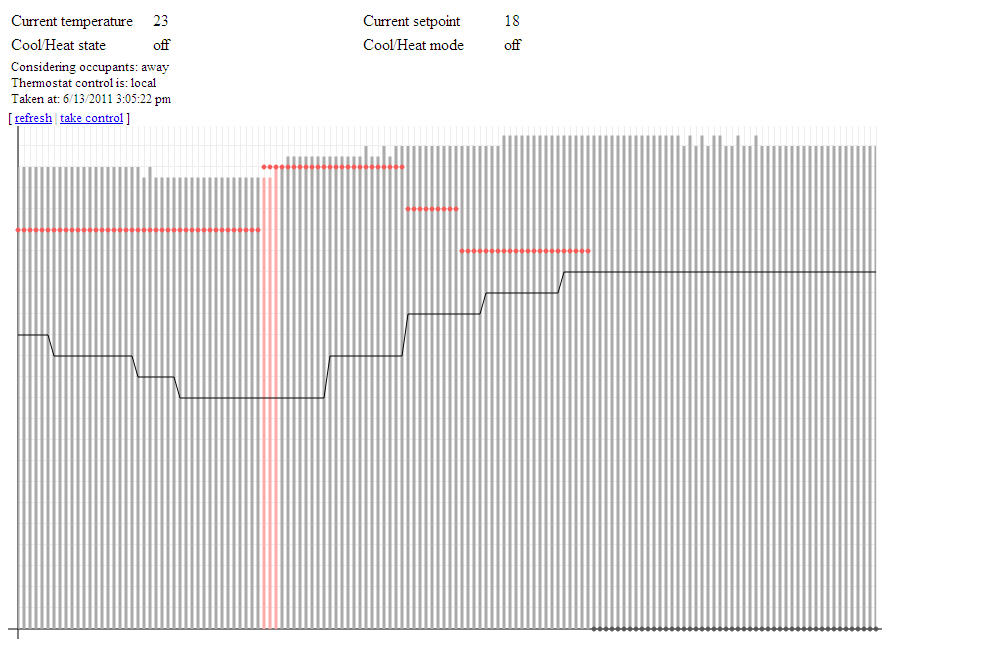 The graph actually shows quite a bit of information. The bars show interior temperature, the line shows exterior temperature, and the dots show the desired interior temperature (the “setpoint”). Both the setpoint and the interior temperature can be any of three colours each: grey, blue, or red, signifying the hvac mode and state (off, cool, or heat). So the red bars in the graph at the left show that the hvac was heating the house at that point in time, while the red dots indicate that the thermostat was in heat mode.
Notice that the setpoint eventually goes grey; this is related to the upward trend in the exterior temperature, represented by the solid line. That’s putting the “smart” in smart thermostat 🙂
Also worth noting here is that I’m using JSON for the first time to pass this information from the backend to the webpage. Nifty stuff. I fully expect that I’ll be porting my knowledge to projects at the 9-5; I’m particular amped about using <canvas> to bring some improved visuals to our main web-based app.
[update 2011/09/15] Occupant prediction is active and working well. So far the crystal ball can’t see too far out in the future, by virtue of the fact that normal commutes are too short for any meaningful trending data to become obvious. For my commute the system seems to be averaging 15-20 minutes of foresight, while Shelly’s commute garnered an impressive 40+ minutes today. Not bad.
With this level of performance I’ll probably end up increasing the “away” heating offset to something like 2.5-3C from its current 2C. The cooling offset is a little trickier, as the hvac seems to have a harder time lowering the temps in the house.
[update 2011/10/05] So the system proved its merit the other day, doing exactly what I intended it to do re: occupant prediction. The conditions were such that this particular instance represented the first time the system exhibited practical usefulness due to the prediction code.
See the graph below:
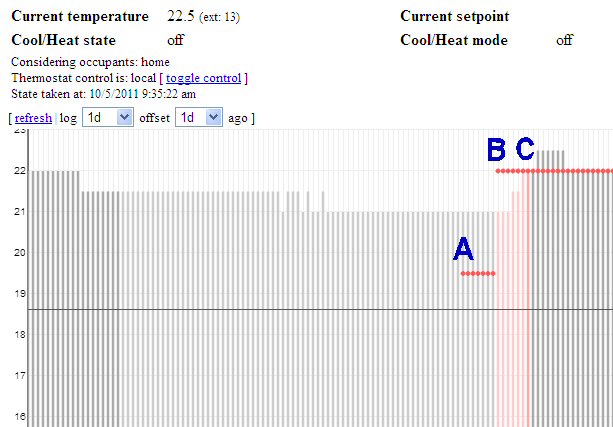
Occupant prediction in action
A: at 5:00PM, the thermostat switched to a new program. This program calls for a temperature of 22C. Since nobody was home, the automation system called for a temperature of (22C – 2.5C = ) 19.5C. The HVAC was not turned on as the measured temp was higher than 19.5C, however the system was “armed” (set to heat mode) as the measured temp was within a predetermined range of the desired temp.
B: at roughly 5:35PM the system determined that occupants were on their way home. Looking at the logs I believe it estimated an arrival time of 5:55PM, but that’s not important; what’s important is that, at 5:35PM, the automation system told the thermostat to remove the offset so that the thermostat would now target the program temperature of 22C. Notice that the thermostat turned on the HVAC at this point, since the measured temperature was below 22C. Also note that the bars representing the measured temp are a light red, indicating that the system was heating while nobody was home.
C: at roughly 6:05PM the automation system detected at least one occupant. The bar for measured temp appears as a darker red to reflect this new occupant state, and to indicate that the HVAC was still heating the house. At the next polling cycle (5 minutes later) the HVAC had reached the desired target of 22C and therefore switched off.
The result? The house was cozy warm when I got home, due solely to the fact that the automation system knew I was on the way home. Good news!
[update 2011/10/15] I just came across this post which details another project which talks about HVACs and occupancy prediction – albeit a project operating under the umbrella of a well-known corporate entity. The project calls itself PreHeat, and while both approaches (mine and theirs) depend on occupant detection, they differ in that the PreHeat method uses historical occupancy data to predict future trends – whereas mine uses actual occupant-location data. One could argue that, on the face of it, my approach would offer more accurate predictions. However, PreHeat doesn’t rely on an external service API and is able to derive all of its data simply on the basis of actual bodies being home.
Regardless, I thought it cool that there are other people working on solving the same “problems” as I am 🙂
[update 2011/12/29] Evolution of the code continues. The latest addition is a post-heat fan circulation feature, which runs the fan for a few minutes after a heat-cycle in order to help equalize temperatures throughout the house. This is a feature that some thermostats come with out-of-the-box, and it’s quite useful. My thermostat doesn’t have this feature built-in, but the home automation system is capable enough that I can add these sorts of features myself. Along the same lines I had also previously added a window condensation-reduction mode, which runs the fan periodically for 30 minutes or so overnight if external temperatures are low enough and a heat cycle hasn’t occurred in some time. And when the system is in cooling mode, the automation system will start running the fan if internal temperatures are rising and approaching the desired setpoint – the idea being to mix the warmer air on the upper floors with the cooler air in the basement.
It’s just nice to have that amount of control and versatility.
6 thoughts on “Adding a smart thermostat to the mix [update 2011/12/29: versatile]”
Comments are closed.
 Deryk Piper's Blog
I like your solution, and I saw your post on http://forums.radiothermostat.com/viewtopic.php?f=11&t=4960
I’m wondering if you are interested in open sourcing your code or working with “jzongker” (Thats not me) but he has a cool solution also, only downside is it seems to be coded using .NET but it is open source. I live in Tucson, AZ, USA and I purchased the filtrete version from home depot. I am personally looking into a way to automate a window fan and maybe some exhaust fans to help automatically cool the house during the non-summer times (when I don’t need heat or cool a/c much), I still need to figure out how to automate the window since they are auto locking windows.I enjoy hacking, but I don’t want to hack the window too much 🙂
Hi James,
The majority of my code is actually written in classic ASP (VBScript) – except the Bluetooth detection code, which is C on Win32 – and is tightly integrated into the rest of my home automation solution. So it’s all custom, but I have no problem sharing the concepts that make it all work and even converting some of the logic into some kind of pseudo-code.
I am interested in how you calculate when you turn off the A/C/heat, when its not feasible to keep it on. I have a feeling just from your graph that I will probably need to make some changes to your calculations, but I am interested in what data you are using also. As of right now all I am personally doing is graphing my weather station and my internal temps and target temp with one graph. I am also implementing “jzongker”’s temperaturemonitoring.com with tasker automation, so when I enter and exit my predefined boundry it sets the temp to a fixed away/home temperature. which isn’t dynamic enough for me since when the seasons change I have to manually change my rules, or make more rules in tasker, and I like your idea about a dynamic target temp based off of the program. But Again, I am looking for a more dynamic solution. 🙂 I just haven’t figured out a better solution yet 🙂
Side note: when trying to add comments to your site, I scroll almost all they way to the bottom, and it either scrolls back up or its auto loading more data or something, It seems like a auto-pagination ‘feature’ but maybe you should add more to the footer or something. Just an idea.
Thanks,
James
Hey James,
Not sure about the scrolling issue. Truthfully this site doesn’t get much traffic, so I wasn’t aware of your issue previously. I’ll try reproducing it to see what the problem is.
Regarding the tstat on/off determination:
The code looks at the average external temp over the last 90 minutes. In my case, the data is collected from Yahoo!’s weather API, as I don’t have a weather station. If the external temp is within 2C of the heat program setpoint or 1C of the cool program setpoint, then the tstat mode is switched to off – regardless of the interior temp. The offsets are a matter of preference, but the thinking is that you can probably tolerate an ambient temperature that is “close enough” to your desired setpoint, were you to open some windows.
(the system will actually send me an email suggesting just this course of action, provided the house is occupied when the tstat is forced off 🙂
In your case, if you determine that the tstat should be off but internal temps are higher than the cool program setpoint, you could then activate your exhaust fan. This is something that I want to do as well, but I don’t have the necessary hardware.
So it’s a simple determination to make. It could be more complex – perhaps look at cloud cover, wind speed, changes in barometric pressure, etc – but then you’re getting into complex (and subjective) calculations similar to humidex or heat index calcs. For now I’m experimenting to see how the constant offsets work out, and how long of an average I should be looking at for external temps.
Regarding home/away setpoint:
This may require a significant amount of work, on either your part or jzongker’s part.
We can bring this discussion back onto the radiothermostat.com forums, since it may be of interest to people there. For the home/away stuff I’ll reply to jzongker’s thread titled “API Request – Home/Away Toggle” in the Advanced Technical Information forum.
Hrmm… you’ve given me an idea. It may be a better to look at the current external temp vs. an average to determine if it’s heating up or cooling down outside. Then the logic becomes:
– if it’s cooling down outside and the current outside temp is within 1C of the cool program setpoint, turn off the tstat
– if it’s heating up outside and the current outside temp is within 2C of the heat program setpoint, turn off the tstat
Interesting…