What. The. Heck. (aka Power Gremlins)

There’s some kind of laptop voodoo going on in this house.

My Acer netbook has been deader than a doorknob for the past 2 or 3 months. Shelly was using it and, apparently it just turned itself off and that was that. I tried everything that I could think of: tried running it without the battery installed, running without any accessible internal cards removed, running with the hard drive removed… nada. Absolutely no lights would illuminate on the thing, not even the battery-charging LED.

And the likely culprit given these symptoms – the mainboard – would be as much to replace as the computer was worth.

Now, I don’t know if I ever wrote about it, but my previous Dell laptop also suffered a similar power-related illness, only to revive itself after some time. That laptop got itself to a point where it shut itself off, and trying to power it back on would illuminate the power LED for a few seconds, followed by an audible click, and the LED would extinguish. What followed was a complete teardown and rebuild, but the problem persisted until…

…one day the laptop just started working again of its own accord.

Eventually it started acting up again with its old shenanigans, but the point is that it too exhibited power issues long before this netbook was ever conceived.

Also of interest is that, around the time of this first odd behaviour of my Dell laptop, my alarm clock also had interesting fits of display hieroglyphics… only to go back to normal around the time the Dell “fixed” itself.

Now, my immediate thought at the time was some sort of voltage issue with the house mains. And yet, nothing else was exhibiting problems. And even with the most recent incident involving the netbook, the power was disconnected when Shelly was using it.

Which isn’t to say that there wasn’t some previous power-related damage which finally caused the machine to give up the ghost. But… how do you explain its current resurrection?

So I’m at a loss. And the next question is, will the netbook give up the ghost again? Time will tell I suppose.

DP and HTML5 – strange bedfellows

So a few days back I got my hands a bit dirty with HTML5’s CANVAS tag.  And some number of weeks ago I got into the history object and HTML5’s improvements to that.  Today I got my feet a little wet with the AUDIO tag.

It’s an interesting concept, really.  This most recent journey has been within the context of the home audio system, and I was just just just remarking to myself that development was at a virtual standstill for a number of months – and here it is that HTML5 is enabling a new coding push with real-world usability.

Well, that’s the theory.

The truth is that HTML5 and embedded media consumption are themselves strange bedfellows, and as a result, I find myself in the same position in my relationship with HTML5.

So forget about the abstracts.  My music collection is overwhelmingly encoded in the MP3 format.  And when I say overwhelmingly, I really mean completely – with the exception of perhaps 20 tracks, vs. the other 35,064 which are MP3’s.  The problem with MP3 – besides its lossy, yesteryear compression – is that it’s not in the public domain.  This doesn’t really mesh well with HTML5 – specifically, the AUDIO tag of HTML5 – which wants to work with open standards and hence is at odds with MP3.

So how does this affect me and my home audio system?  Glad you asked.

You may recall that the system consists of 2 physical zones, 4 general-purpose streaming zones and one special-purpose streaming zone.  It’s the general-purpose streaming zones that I use extensively when I’m not at home – ie, at work or in the car.  And despite advancements in the manner by which my intranet resources are made publicly “available”, the real truth is that using the streaming zones has always been a two-part affair; part one is to interact with the system using a browser, part two is to connect to the zone using a program on the client device.

Granted, quite often I can eschew part one, as the zone is loaded and good-to-go as soon as the client connects.  But one thing that really dogged me incessantly – besides security considerations that I won’t go into here – is the absence of any ability to play a single track without having to leave the web browser.

Yes, I’m talking about a desire to implement an audio client within the browser itself.

Now, Flash is capable of doing this.  And while Shelly’s phone doesn’t support Flash (argh), the truth is that Flash isn’t completely suited to the next logical step in this thought process – which is, replacing the streaming zones with a webpage and embedded player.  I mean, I could code a Flash app, but trust me when I say that that’s not going to happen.

But would could happen – and indeed, what I really, really, really want to happen – is to code an HTML5 “app” that can do this.  This would actually solve all sorts of niggling problems, like the issue of transport control that I talked about here.  The truth is that it could actually serve as a bonafied mobile music app, optimally designed for the small screen.

It could, if… MP3 and HTML5 played nicely together in all modern browsers.

And that’s the problem I’m having right now.  I’ve worked out the interaction, I’ve figured out that the current home audio system can easily support the types of XHR calls I’d need to make, I’ve got some working knowledge of JSON… heck, I’ve even got a working implementation now of an embedded player for playing single tracks.  But to make this all work I need HTML5 and it’s DOM-accessible AUDIO element, and I need cross-browser support of MP3 files via that same AUDIO element.

Desktop support is sketchy – as is mobile support.  I find it strange that Opera on Windows doesn’t support MP3 but Opera on Android does…?  And the native Android browser is supposed to support MP3 but it actually doesn’t.  <sigh>  The truth is that there’s no point burning the proverbial midnight oil on an HTML5 music player app for my audio system if support is hit-and-miss – across the devices that I actually use.

So as much as I’d love to cuddle up close to HTML5, the unfortunate truth is that it’s playing hard to get.

Leave it to Apple

I’m waiting for the first company to come along and seamlessly integrate all of your mobile and media devices. And while I still think that Apple’s living room play needs some work, I have to admit that they made big strides in the direction of data ubiquity with today’s iOS5 and iCloud announcements.

Truthfully – I have to agree with Steve’s comments about obliterating the notion of a filesystem from the average user’s lexicon. Such a thing really should be the domain of power users and server administrators.

Although… I’d prefer a standards-compliant solution rather than entrusting Apple with all of my personal data, but that’s beside the point here. Again, it’s the seamless movement and  availability of data across multiple devices that I think is kewlio.

But… yes, there’s always a but… I see one glaring problem.

While it’s great that I may have multiple devices that can all access the same data such that that data appears to be saved locally, I think that my perspective as a family man (or at least, a person in a relationship) leaves me wanting more.

One of the questions that I get asked often by the Mrs. is “why she doesn’t have the latest photos that I’ve just taken?”. Now, at first glance, it would appear that Apple has a potential solution to this problem; put us both on iPhones (sorry DSLR) and Bob’s your uncle (cloned Apple ID issues notwithstanding).

But that’s a fairly large caveat, having to exclude my DSLR… and any non-Apple product for that matter. Even more of an issue is, does Apple allow me to determine what flies into my iCloud photostream, instantly appearing on the wifey’s phone?

And even if they did, I’m then back to having to introduce some semblance of micro-managing my photos. That’s a large part of the seamless equation that just got cancelled out.

As a family man, you quickly realize that the notion of “me” takes a back seat to the notion of “us”, such that pretty much all of the memory-gathering that you do is for the benefit of the family unit and not your own personal (nefarious?) means. Even issues of music become group debates, at least with the significant other, unless you make a point of walking around your abode rocking white earbuds. In which case one has to wonder what the value is in being able to seamlessly share your iTunes library across 10 other devices, when only one of them is likely to serve as you portable music provider.

The case for Apple’s iCloud services is certainly stronger when you start talking about the stuff that falls under the traditional domain of the cloud – namely, office productivity and document management. But the media part of the puzzle is fraught with more variables and I just don’t think that Apple has solved that equation yet.

It may be that that particular equation has no solution.

My dismal track record of worthwhile TV shows

It’s mostly the sci-fi genre that I’m losing out to it seems:

– Firefly
– Defying Gravity
– Star Trek: Enterprise
– Stargate Universe

I mean, these are shows that I was really into. And looking at the list, I believe it was more for the character development than anything particularly sci-fi in nature. Perhaps the sci-fi crowd is more interested in the, you know, sci-fi.

Other shows that didn’t make the cut:

– Men in Trees

And the rest that are mildly entertaining and likely on the way out:

– Fringe
– V
– The Event

Adding a smart thermostat to the mix [update 2011/12/29: versatile]

So you may or may not know that I’ve got this Whole Home Audio system and networked surveillance system; both are combinations of off-the-shelf hardware and custom software.  Together, they’ve been carrying the torch for my fledgling home automation aspirations.

A full-fledged home automation system can do all sorts of cool things – control lights, sprinklers, link to the alarm system, interface with voicemail, play mood music, etc.  In general, you’re talking Entertainment/Convenience, Security, and Comfort.

I’ve finally added Comfort to the mix, by way of a WiFi-enabled thermostat.

I’ve had my eye on this category for some time, having read about X-10 and ZigBee and any number of other communication protocols.  And while I may agree that a large abode can benefit greatly from complex automation, I always considered a smart thermostat to be the first order of business.

First, some clarification.  I’ve been running programmable thermostats for years, as I’m sure most of you have.  There are real energy savings to be found by setting your furnace to drop a few degrees at night or during the day when you’re not at home.  And if you work a 9-5, then the thermostat’s schedule-based program is likely sufficient.

I do work a 9-5, but my weekend schedule is often up in the air, and there’s no real guarantee that my life will adhere to my thermostat’s schedule.  If you happen to forget to hit the “away” button when you run to the mall, then the real answer is that your home is being heated unnecessarily until you get back.  And if you err on the side of being miserly, then you may find yourself a little chilly (or hot) on the weekend because you forgot to set a comfortable temperature.

My forays into occupant awareness, then, were necessary prerequisites to a smart thermostat.  The next prerequisite was cost, and Radio Thermostat Company of America has ticked that box with their US$99 CT-30 thermostat.

The thermostat connects to your home wifi network, just as your laptop would, and once connected it talks “to the cloud” so that you can access your thermostat using a web browser or smartphone app.  This is great – but the real usefulness for me lies in the Application Programming Interface, which means that my custom-built home-automation system can talk to the thermostat.

As such, the thermostat’s typical 7-day/4-program schedule is set to maintain acceptable at-home temperatures, while the home-automation system – being occupant aware – can override the thermostat and set a lower (or higher) temperature when nobody is home.

So can I expect to save $99 on my gas/hydro bill with this solution vs. a typical programmable thermostat?  Maybe.  Does this solution check all of the right boxes as a hobby project with real-world usefulness?  Most definitely 🙂

I’ve only recently finished the coding that controls the thermostat, so I’ll keep an eye on it over the next few days to see how it performs.  After that I’ll add some logging (to see when the hvac system is actually on and for how long) as well as the requisite intranet webpages for feedback/control.

[update 2011/04/29] While I haven’t had any real problems with the thermostat and the home-automation integration, I decided rather quickly that it needed to be even smarter.

I’ve moved from a fixed “away” temperature to an offset method, where the system sets the “away” temp as an offset of the program temp.  This is to handle the situation where the house is uncomfortably cold/hot when you arrive.  Instead, it will now be about 2C off of the program temp, which will still result in acceptable savings.

Right now I’m struggling with a complex matrix of situations involving overriding the automation system.  I think I’ve got something but I’ve run out of time right now, so more later.

[update 2011/06/01] So this setup has been working pretty well.  But I decided that I wanted more variables.

They say that no man is an island.  Well, so it is that no HVAC system is an island either.  In this case, the surroundings – external temperature – play into the efficiency and performance of the HVAC system.

So I added some code to make some decisions based on external temperature (which may include windchill or humidex).  As it stands now, the automation system will actually set the HVAC system to an “off” state if it determines that external temperatures don’t warrant consuming resources to heat/cool the house.  The thinking is that you can open a window and let nature do the work instead.  This will occur even if temperatures are higher/lower than the desired setpoint, which would normally result in the HVAC running.

The method is extensible, so if I need to get really exotic then I can look at cloud conditions and windspeed as factors which can influence the decision.

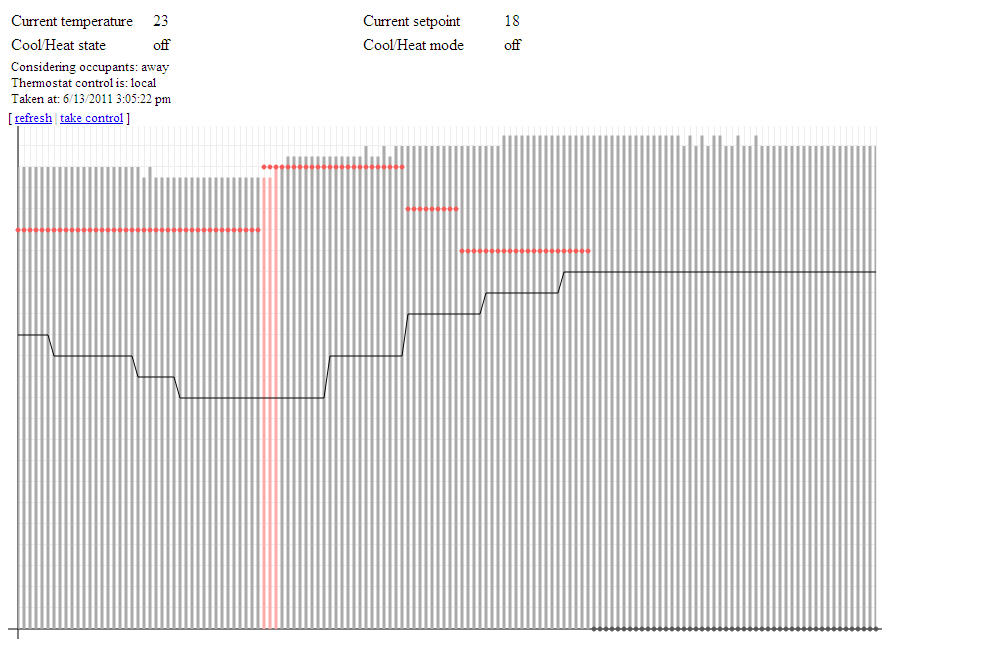
[update 2011/06/13] Here’s a screenshot of the work-in-progress webpage that provides current state and historical information about the thermostat.  The graph also represents my first foray into the HTML5 canvas tag.
The graph actually shows quite a bit of information.  The bars show interior temperature, the line shows exterior temperature, and the dots show the desired interior temperature (the “setpoint”).  Both the setpoint and the interior temperature can be any of three colours each: grey, blue, or red, signifying the hvac mode and state (off, cool, or heat).  So the red bars in the graph at the left show that the hvac was heating the house at that point in time, while the red dots indicate that the thermostat was in heat mode.

Notice that the setpoint eventually goes grey; this is related to the upward trend in the exterior temperature, represented by the solid line.  That’s putting the “smart” in smart thermostat 🙂

Also worth noting here is that I’m using JSON for the first time to pass this information from the backend to the webpage.  Nifty stuff.  I fully expect that I’ll be porting my knowledge to projects at the 9-5; I’m particular amped about using <canvas> to bring some improved visuals to our main web-based app.

[update 2011/09/15] Occupant prediction is active and working well.  So far the crystal ball can’t see too far out in the future, by virtue of the fact that normal commutes are too short for any meaningful trending data to become obvious.  For my commute the system seems to be averaging 15-20 minutes of foresight, while Shelly’s commute garnered an impressive 40+ minutes today.  Not bad.

With this level of performance I’ll probably end up increasing the “away” heating offset to something like 2.5-3C from its current 2C.  The cooling offset is a little trickier, as the hvac seems to have a harder time lowering the temps in the house.

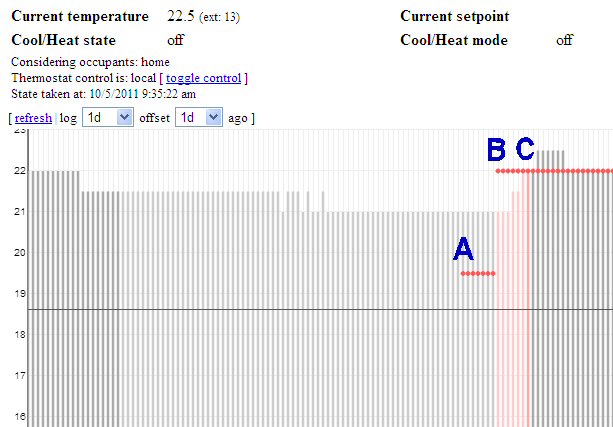
[update 2011/10/05] So the system proved its merit the other day, doing exactly what I intended it to do re: occupant prediction.  The conditions were such that this particular instance represented the first time the system exhibited practical usefulness due to the prediction code.

See the graph below:
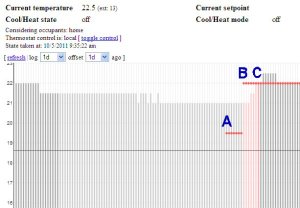
Occupant prediction in action

A: at 5:00PM, the thermostat switched to a new program.  This program calls for a temperature of 22C.  Since nobody was home, the automation system called for a temperature of (22C – 2.5C = ) 19.5C.  The HVAC was not turned on as the measured temp was higher than 19.5C, however the system was “armed” (set to heat mode) as the measured temp was within a predetermined range of the desired temp.

B: at roughly 5:35PM the system determined that occupants were on their way home.  Looking at the logs I believe it estimated an arrival time of 5:55PM, but that’s not important; what’s important is that, at 5:35PM, the automation system told the thermostat to remove the offset so that the thermostat would now target the program temperature of 22C.  Notice that the thermostat turned on the HVAC at this point, since the measured temperature was below 22C.  Also note that the bars representing the measured temp are a light red, indicating that the system was heating while nobody was home.

C: at roughly 6:05PM the automation system detected at least one occupant.  The bar for measured temp appears as a darker red to reflect this new occupant state, and to indicate that the HVAC was still heating the house. At the next polling cycle (5 minutes later) the HVAC had reached the desired target of 22C and therefore switched off.

The result? The house was cozy warm when I got home, due solely to the fact that the automation system knew I was on the way home.  Good news!

[update 2011/10/15] I just came across this post which details another project which talks about HVACs and occupancy prediction – albeit a project operating under the umbrella of a well-known corporate entity.  The project calls itself PreHeat, and while both approaches (mine and theirs) depend on occupant detection, they differ in that the PreHeat method uses historical occupancy data to predict future trends – whereas mine uses actual occupant-location data.  One could argue that, on the face of it, my approach would offer more accurate predictions.  However, PreHeat doesn’t rely on an external service API and is able to derive all of its data simply on the basis of actual bodies being home.

Regardless, I thought it cool that there are other people working on solving the same “problems” as I am 🙂

[update 2011/12/29] Evolution of the code continues.  The latest addition is a post-heat fan circulation feature, which runs the fan for a few minutes after a heat-cycle in order to help equalize temperatures throughout the house.  This is a feature that some thermostats come with out-of-the-box, and it’s quite useful.  My thermostat doesn’t have this feature built-in, but the home automation system is capable enough that I can add these sorts of features myself.  Along the same lines I had also previously added a window condensation-reduction mode, which runs the fan periodically for 30 minutes or so overnight if external temperatures are low enough and a heat cycle hasn’t occurred in some time.  And when the system is in cooling mode, the automation system will start running the fan if internal temperatures are rising and approaching the desired setpoint – the idea being to mix the warmer air on the upper floors with the cooler air in the basement.

It’s just nice to have that amount of control and versatility.
RIM Blackberry Playbook: a solution to the multi-user conundrum?

Not too long ago I wrote about one of my perceived issues with today’s variety of tablets; that is, the lack of multi-user solutions to such things as native email access and other personal information.

To recap – I don’t want guests to pick up my tablet and have unfettered access to my email.  This may not be an issue with web-based email, where you can make a point of signing off after each email session, but it’s definitely an issue with native apps and their cached credentials.

But a strange thing happened today.  RIM launched the Blackberry Playbook, and it just dawned on me that one of its most-maligned “features” could actually serve to solve the multi-user conundrum.

I’m talking about the Blackberry Bridge method of pairing to your (Blackberry-)smartphone and gaining immediate, seamless access to the email and calendar stored therein.  I use “stored” loosely, since there’s no requirement that the data actually resides on your smartphone, but rather that your smartphone is configured to access that data around the clock.

So there it is – you can sit your tablet on the coffee table and nobody can access your email because they can’t pair it to your smartphone.

Would that feature be enough to reverse a recent tweet I made, decrying the Playbook as an also-ran? (at least, for the short-term – which can easily become a very-long-term in the technology industry)

No – since you won’t see me sporting a Blackberry anytime soon.  And for the larger audience of tablet-yearning consumers, I still say “no” – since I’m not aware of many consumers who share my particular brand of concern.

Now, all hope is not lost.  Some time ago BMW and RIM announced a hook for the iDrive interface allowing you to access text messages and emails on your Blackberry through iDrive.  This interested me – mildly – since I like iDrive and I like technology.  But I don’t love it enough to require my car to link to my text and email messages on my phone, particularly when those two things are at the bottom rung of today’s legions of socially-connected solutions (ie, Twitter, Facebook (ugh), and myriad BBM-competing freeware).

But the point is that it’s within RIM’s ability to extend Blackberry Bridge to non-Blackberry devices – and perhaps there would be more consumers willing to emerge from the dark and confess that they, too, seek some sort of user-partitioning when it comes to personal, private data on their tablets.  Perhaps this could be RIM’s great differentiator re: Playbook vs. iPad and co.

Hrmm.

Universal Search in the Home Audio interface

Development has been slow on the Home Audio system lately.  Which isn’t to say that it’s not getting used; rather, I’ve been busy doing other things – some technology related, some not – and the system is quite mature at this stage after many years of development.

Nonetheless, ideas pop up every now and then and they’re compelling enough that it’s worth it to dust off the code and Make It Happen(tm).

Such is the case with “universal search”.  Regular followers of this blog will know that the search function is already quite powerful, so much so in fact that you can get lost in the features – and possibly become turned off from search completely if you’re trying to do something simple.

It dawned on me the other day that it would be really nice if I could simply search for a string without having to specify the field to search on.  So for example, I want to search for “lounge”, but I don’t necessarily want to give the system any more information than that.  With “universal search”, the system will search:

  • artist
  • title
  • category
  • genres
  • year

… for your particular search text.  You enter your text once and the system searches all of these fields.

In hindsight – and from your perspective – this is one of those “well duh!” sort of things.  But again, it’s easy to get caught up in gee-whiz features and completely neglect the stuff that seems obvious.  So pardon moi, but at least the feature is there now <g>