Server upgrade? [update: 2012-02-17]

Ah, the life of a consummate hardware tinkerer.

Blog devotees will know that my “Home” server is the guy whose job is to run the house – in-so-much as the house can be run by a computer, that is.  More commonly noted in these journals as “Home Automation”, the Home server is primarily responsible for surveillance, HVAC, Whole Home Audio, TV show transcoding, and a host of other support services.

Said server has had a long history of service, although the only original parts are probably the case, power supply, and some hard drives(!).  And after just over 3 years with its current hardware configuration, it would seem that a significant shift is about to occur.

So significant, in fact, that I’ve had to come up with a new “P”-prefixed name for said server.  Yes, *all* of my computers are named with a “P” as the first character…

Anyhoo, this started about a week ago when I noticed some “previous system shutdown was unexpected” messages in the event log.  And some quick investigating led me to conclude that hardware was – again – the cause of the problem.

I was left with three choices:

  1. Retire the Home server and move all functionality to the remaining (“Internet”) server.
  2. Troubleshoot the problem and replace the failing component.
  3. Start from scratch with a new server

My “best practices” principles ruled out option #1.  And with time at a premium these days – and given that the Home server is based on technology that’s over a decade old – I decided to take the $$$ plunge and build a new system utilizing modern(ish) technologies.  Some things I’ve wanted for some time – like RAID1 drive redundancy – and other things I’ve had no experience with and wanted to have at least some passing familiarity (like SATA… yes, *all* of my drives are PATA!!!)

I also decided that I wanted to go with an Intel motherboard and processor solution.  In all of my professional and personal years dealing with computer hardware, I can’t recall one time that an Intel product has failed (especially motherboards).  I may be unique in this experience, but I decided to pay the extra money and go Genuine Intel.

Unfortunately I may have been too presumptuous during my decision-making process, as I opted for any old Intel board that had the hardware features I wanted (among them, 3 PCI slots) and didn’t spend too much time worrying about the “***DESKTOP***” branding that graced the packaging and product designation.  So it was that I came home, spent an untold amount of time putting the hardware together, and found myself unable to install my server software due to driver issues – all of which were arbitrary on Intel’s part, wanting their DESKTOP boards to have no business running SERVER software.

So it took a few nights and early mornings to finally get Windows Server 2003 installed and recognizing the DZ68DB board’s many features.  Thanks to Google and these pages for the invaluable assistance.

That was the first hurdle, and I knew that the software setup would be a multi-day affair.  Unfortunately I’ve run into another (temporary) roadblock, which is that the act of promoting this Windows 2003 Server to a Domain Controller has been foiled by Exchange 2000-related issues in my Windows 2000 AD schema.  Argh.  And while I value the learning experience, at this point I just want to get to the point where I can start moving services to this new “Home” server from the old “Home” server.  I’m really looking forward to the significant increase in speed that this server should bring, particularly with respect to show transcoding and database operations.

So I’ll update this post when I have more to report.

[update 2012-02-17]

So I’ve surmounted most (all?) of my AD-related issues, and the server is chugging along quite happily.  Girder gave me some issues – particularly in the area of launching processes – but this was resolved by changing the window parameter from “hide” to “show”.  Had to do it for both the open process and kill process (this is more a note to myself for future reference…)  I was also pulling my hair out over mixer issues until it dawned on me that the references to the hardware on the old server were probably causing Girder to get mired in some thick mud.

Anyhow I can say that services are smoking fast; DivX transcoding is limited by the speed of the network transfer from the PVR machine (which is currently the Internet server but will soon become the Home server).  The responsiveness of the whole-home audio interface is likewise much improved, as is the whole set of intranet pages (particularly noticeable when looking at archived HVAC and surveillance data).

I’m still in the process of moving my network-stored movie images from a local disk on the old Home server to a local disk on the new server.  This task’s painfulness is exacerbated by the insistence of the old server to spontaneously reboot whenever I try to initiate such a file transfer over the network – which certainly would seem to mimic the original problem which started this whole process in the first place.  The question still remains as to why this causes a server reboot.

Anyhow, I’m using the external 1TB drive (thanks Mark!) to sneaker-net the files from the old server.  However, we’re talking about something like 40GB of data (or is it 80GB?), which is very slow to transfer using the old server’s USB 1.1 ports…

Other than that, I’ve finally got full data redundancy thanks to Second Copy (thanks Daniel!) and that very same 1TB drive.  NTBackup is backing up the system and data drives on both servers, saving said backups to the external drive; and Second Copy is doing one-way replication to the external drive of all media on a nightly basis.  To Centered Systems – the cheque will soon be in the mail 🙂

Me <3 Opera Mobile

So I’ve been doing some work off-and-on on a mobile version of the site I use to browse/play music on my home network. I’ve wanted a mobile-optimized version of the site for some time, and a recent development with my SHOUTcast streaming client of choice has made this project more of a necessity than a curiosity.

Critical to the operation of the site is the ability to touch-scroll various regions in the page. That, and the ability of the browser to support HTML5 Audio in the MP3 format. And so far, I’ve only found Opera Mobile to be worthy of solving the HTML5 Audio part of the equation while also remaining my mobile browser of choice.

However, I was having no luck with the touch-scrolling part of the equation. Many mobile browsers seem to have a problem handling straight-up overflow:scroll, and even the iScroll Javascript library wasn’t solving my particular flavour of problem. And what was working was working at a horrible pace.

Then I happened to notice that a manual update for Opera Mobile was sitting in my Android Market queue. Among reported changes was an update to the core (or engine) that the Android version of the browser was using. And wouldn’t you know it – upgrading to this version solved all of my touch-scroll issues, and performance is about as snappy as it is on the desktop Opera Mobile emulator.

So colour me happy. Now that the site is functional, I can work on prettying it up and adding gee-whiz features 🙂

OAuth 2.0 and Latitude API [update: it works!]

So my smart thermostat has been doing its homework and keeping itself abreast of new developments.  I’ve been tweaking the automation code and adding bits of logic to accommodate my particular nuances.

You may recall that one of the most important features of my setup is an ability for the system to automatically determine home/away status.  This is based on Bluetooth detection; and while I’ve still to add a large antenna to extend the detection range, I’m also acutely aware that this method of determining home/away status will always be reactionary vs. predictive.

As usual, the Wifey Factor(tm) is playing a critical role here.  A comment was made recently – well, a question actually – as to whether the HVAC system knows when we’re on the way home so that it can start heating/cooling the house automatically.

Admittedly, such a usage of the system leans more on the side of comfort than efficiency.  And I’ve already made a concession to comfort by setting a small(er) offset between home/away temps.  (IIRC, it’s something like 1C in cooling mode and 1.5C in heating mode).  I’ve also approximated a “should be getting home soon” decision process by setting evening programs which differ from the daytime programs; ideally, you’d really only need an overnight program and a not-overnight program, and the occupant detection would determine the home/away offset.

But I digress. In an effort to solve this little problem while also furthering my understanding of web-based technologies (ie, the Cross-Pollination(tm) effect, search the blog 🙂 I decided that the answer may lie in utiliizing the Google Latitude API.

We already use Latitude for tracking purposes, so the privacy concerns have been addressed already.  The premise, then, is simple – my automation system polls Google, gets our locations as reported by Latitude, and then does some calculations to determine if we’re on the way home.

Simple in practice, yes.  More difficult in execution, but only marginally.  One of the unknowns here was OAuth, which serves as Google’s (and many web services’) API authentication/authorization method.  I’d heard about OAuth, but never had a need to look into it – either for work or personal means.

And that’s a shame, really. Anyhoo, OAuth is done and done and now I’ve got my automation system pinging Latitude, calculating distances, and producing raw-ish data that I’ll later analyze to determine the most suitable “peeps are on the way home” algorithm.  I may even use it to supplement the Bluetooth detection method, which is sometimes hit-or-miss in lieu of that big antenna…

One of the more challenging aspects has been deciding what to do with outlier data points.  Latitude has this habit of sending you off 100’s of kilometers in some random direction for no apparent reason; we certainly don’t want the automation system going bonkers by thinking we’re flying in at Mach 5 from some random city in the US. And while I’m sure that there are many statistical methods that one can use to clean a data-set, such an endeavour would be secondary to the purpose of this project.

So to that end I’m currently using a “line of best-fit” (aka the Least Square Method) to fit a straight line to my Latitude data points.  It doesn’t completely solve the outlier problem, but it lessens the impact somewhat.  Anyhow I’ll pore over the resultant distance calcs over the next few days and…

… I’ll post back when I’ve got useful performance data.

[update 2011/09/15] Seems to be working well!  Check out the thermostat post for info.

DP and HTML5 – strange bedfellows

So a few days back I got my hands a bit dirty with HTML5’s CANVAS tag.  And some number of weeks ago I got into the history object and HTML5’s improvements to that.  Today I got my feet a little wet with the AUDIO tag.

It’s an interesting concept, really.  This most recent journey has been within the context of the home audio system, and I was just just just remarking to myself that development was at a virtual standstill for a number of months – and here it is that HTML5 is enabling a new coding push with real-world usability.

Well, that’s the theory.

The truth is that HTML5 and embedded media consumption are themselves strange bedfellows, and as a result, I find myself in the same position in my relationship with HTML5.

So forget about the abstracts.  My music collection is overwhelmingly encoded in the MP3 format.  And when I say overwhelmingly, I really mean completely – with the exception of perhaps 20 tracks, vs. the other 35,064 which are MP3’s.  The problem with MP3 – besides its lossy, yesteryear compression – is that it’s not in the public domain.  This doesn’t really mesh well with HTML5 – specifically, the AUDIO tag of HTML5 – which wants to work with open standards and hence is at odds with MP3.

So how does this affect me and my home audio system?  Glad you asked.

You may recall that the system consists of 2 physical zones, 4 general-purpose streaming zones and one special-purpose streaming zone.  It’s the general-purpose streaming zones that I use extensively when I’m not at home – ie, at work or in the car.  And despite advancements in the manner by which my intranet resources are made publicly “available”, the real truth is that using the streaming zones has always been a two-part affair; part one is to interact with the system using a browser, part two is to connect to the zone using a program on the client device.

Granted, quite often I can eschew part one, as the zone is loaded and good-to-go as soon as the client connects.  But one thing that really dogged me incessantly – besides security considerations that I won’t go into here – is the absence of any ability to play a single track without having to leave the web browser.

Yes, I’m talking about a desire to implement an audio client within the browser itself.

Now, Flash is capable of doing this.  And while Shelly’s phone doesn’t support Flash (argh), the truth is that Flash isn’t completely suited to the next logical step in this thought process – which is, replacing the streaming zones with a webpage and embedded player.  I mean, I could code a Flash app, but trust me when I say that that’s not going to happen.

But would could happen – and indeed, what I really, really, really want to happen – is to code an HTML5 “app” that can do this.  This would actually solve all sorts of niggling problems, like the issue of transport control that I talked about here.  The truth is that it could actually serve as a bonafied mobile music app, optimally designed for the small screen.

It could, if… MP3 and HTML5 played nicely together in all modern browsers.

And that’s the problem I’m having right now.  I’ve worked out the interaction, I’ve figured out that the current home audio system can easily support the types of XHR calls I’d need to make, I’ve got some working knowledge of JSON… heck, I’ve even got a working implementation now of an embedded player for playing single tracks.  But to make this all work I need HTML5 and it’s DOM-accessible AUDIO element, and I need cross-browser support of MP3 files via that same AUDIO element.

Desktop support is sketchy – as is mobile support.  I find it strange that Opera on Windows doesn’t support MP3 but Opera on Android does…?  And the native Android browser is supposed to support MP3 but it actually doesn’t.  <sigh>  The truth is that there’s no point burning the proverbial midnight oil on an HTML5 music player app for my audio system if support is hit-and-miss – across the devices that I actually use.

So as much as I’d love to cuddle up close to HTML5, the unfortunate truth is that it’s playing hard to get.

Adding a smart thermostat to the mix [update 2011/12/29: versatile]

So you may or may not know that I’ve got this Whole Home Audio system and networked surveillance system; both are combinations of off-the-shelf hardware and custom software.  Together, they’ve been carrying the torch for my fledgling home automation aspirations.

A full-fledged home automation system can do all sorts of cool things – control lights, sprinklers, link to the alarm system, interface with voicemail, play mood music, etc.  In general, you’re talking Entertainment/Convenience, Security, and Comfort.

I’ve finally added Comfort to the mix, by way of a WiFi-enabled thermostat.

I’ve had my eye on this category for some time, having read about X-10 and ZigBee and any number of other communication protocols.  And while I may agree that a large abode can benefit greatly from complex automation, I always considered a smart thermostat to be the first order of business.

First, some clarification.  I’ve been running programmable thermostats for years, as I’m sure most of you have.  There are real energy savings to be found by setting your furnace to drop a few degrees at night or during the day when you’re not at home.  And if you work a 9-5, then the thermostat’s schedule-based program is likely sufficient.

I do work a 9-5, but my weekend schedule is often up in the air, and there’s no real guarantee that my life will adhere to my thermostat’s schedule.  If you happen to forget to hit the “away” button when you run to the mall, then the real answer is that your home is being heated unnecessarily until you get back.  And if you err on the side of being miserly, then you may find yourself a little chilly (or hot) on the weekend because you forgot to set a comfortable temperature.

My forays into occupant awareness, then, were necessary prerequisites to a smart thermostat.  The next prerequisite was cost, and Radio Thermostat Company of America has ticked that box with their US$99 CT-30 thermostat.

The thermostat connects to your home wifi network, just as your laptop would, and once connected it talks “to the cloud” so that you can access your thermostat using a web browser or smartphone app.  This is great – but the real usefulness for me lies in the Application Programming Interface, which means that my custom-built home-automation system can talk to the thermostat.

As such, the thermostat’s typical 7-day/4-program schedule is set to maintain acceptable at-home temperatures, while the home-automation system – being occupant aware – can override the thermostat and set a lower (or higher) temperature when nobody is home.

So can I expect to save $99 on my gas/hydro bill with this solution vs. a typical programmable thermostat?  Maybe.  Does this solution check all of the right boxes as a hobby project with real-world usefulness?  Most definitely 🙂

I’ve only recently finished the coding that controls the thermostat, so I’ll keep an eye on it over the next few days to see how it performs.  After that I’ll add some logging (to see when the hvac system is actually on and for how long) as well as the requisite intranet webpages for feedback/control.

[update 2011/04/29] While I haven’t had any real problems with the thermostat and the home-automation integration, I decided rather quickly that it needed to be even smarter.

I’ve moved from a fixed “away” temperature to an offset method, where the system sets the “away” temp as an offset of the program temp.  This is to handle the situation where the house is uncomfortably cold/hot when you arrive.  Instead, it will now be about 2C off of the program temp, which will still result in acceptable savings.

Right now I’m struggling with a complex matrix of situations involving overriding the automation system.  I think I’ve got something but I’ve run out of time right now, so more later.

[update 2011/06/01] So this setup has been working pretty well.  But I decided that I wanted more variables.

They say that no man is an island.  Well, so it is that no HVAC system is an island either.  In this case, the surroundings – external temperature – play into the efficiency and performance of the HVAC system.

So I added some code to make some decisions based on external temperature (which may include windchill or humidex).  As it stands now, the automation system will actually set the HVAC system to an “off” state if it determines that external temperatures don’t warrant consuming resources to heat/cool the house.  The thinking is that you can open a window and let nature do the work instead.  This will occur even if temperatures are higher/lower than the desired setpoint, which would normally result in the HVAC running.

The method is extensible, so if I need to get really exotic then I can look at cloud conditions and windspeed as factors which can influence the decision.

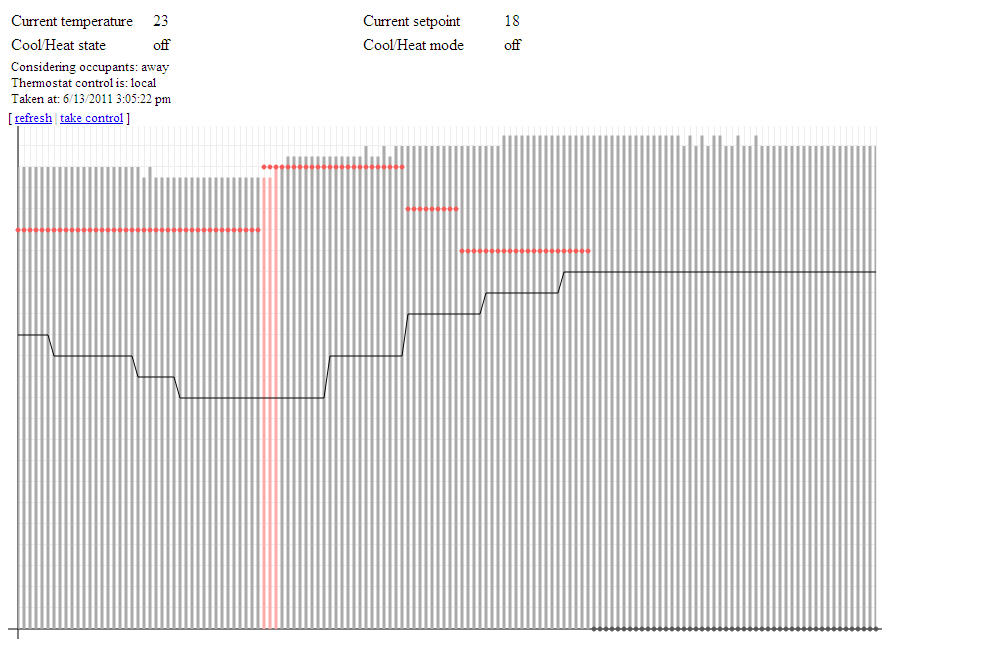
[update 2011/06/13] Here’s a screenshot of the work-in-progress webpage that provides current state and historical information about the thermostat.  The graph also represents my first foray into the HTML5 canvas tag.

The graph actually shows quite a bit of information.  The bars show interior temperature, the line shows exterior temperature, and the dots show the desired interior temperature (the “setpoint”).  Both the setpoint and the interior temperature can be any of three colours each: grey, blue, or red, signifying the hvac mode and state (off, cool, or heat).  So the red bars in the graph at the left show that the hvac was heating the house at that point in time, while the red dots indicate that the thermostat was in heat mode.

Notice that the setpoint eventually goes grey; this is related to the upward trend in the exterior temperature, represented by the solid line.  That’s putting the “smart” in smart thermostat 🙂

Also worth noting here is that I’m using JSON for the first time to pass this information from the backend to the webpage.  Nifty stuff.  I fully expect that I’ll be porting my knowledge to projects at the 9-5; I’m particular amped about using <canvas> to bring some improved visuals to our main web-based app.

[update 2011/09/15] Occupant prediction is active and working well.  So far the crystal ball can’t see too far out in the future, by virtue of the fact that normal commutes are too short for any meaningful trending data to become obvious.  For my commute the system seems to be averaging 15-20 minutes of foresight, while Shelly’s commute garnered an impressive 40+ minutes today.  Not bad.

With this level of performance I’ll probably end up increasing the “away” heating offset to something like 2.5-3C from its current 2C.  The cooling offset is a little trickier, as the hvac seems to have a harder time lowering the temps in the house.

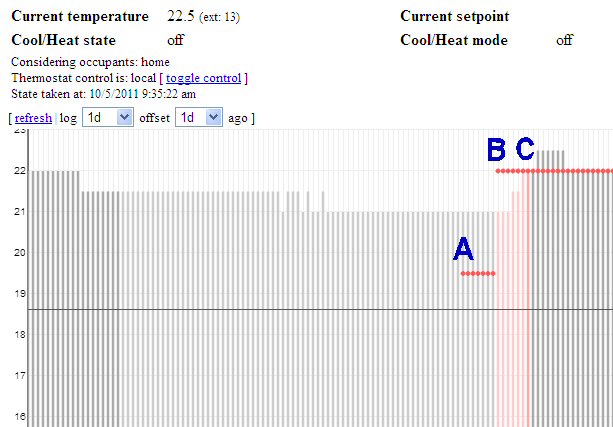
[update 2011/10/05] So the system proved its merit the other day, doing exactly what I intended it to do re: occupant prediction.  The conditions were such that this particular instance represented the first time the system exhibited practical usefulness due to the prediction code.

See the graph below:

Occupant prediction in action

A: at 5:00PM, the thermostat switched to a new program.  This program calls for a temperature of 22C.  Since nobody was home, the automation system called for a temperature of (22C – 2.5C = ) 19.5C.  The HVAC was not turned on as the measured temp was higher than 19.5C, however the system was “armed” (set to heat mode) as the measured temp was within a predetermined range of the desired temp.

B: at roughly 5:35PM the system determined that occupants were on their way home.  Looking at the logs I believe it estimated an arrival time of 5:55PM, but that’s not important; what’s important is that, at 5:35PM, the automation system told the thermostat to remove the offset so that the thermostat would now target the program temperature of 22C.  Notice that the thermostat turned on the HVAC at this point, since the measured temperature was below 22C.  Also note that the bars representing the measured temp are a light red, indicating that the system was heating while nobody was home.

C: at roughly 6:05PM the automation system detected at least one occupant.  The bar for measured temp appears as a darker red to reflect this new occupant state, and to indicate that the HVAC was still heating the house. At the next polling cycle (5 minutes later) the HVAC had reached the desired target of 22C and therefore switched off.

The result? The house was cozy warm when I got home, due solely to the fact that the automation system knew I was on the way home.  Good news!

[update 2011/10/15] I just came across this post which details another project which talks about HVACs and occupancy prediction – albeit a project operating under the umbrella of a well-known corporate entity.  The project calls itself PreHeat, and while both approaches (mine and theirs) depend on occupant detection, they differ in that the PreHeat method uses historical occupancy data to predict future trends – whereas mine uses actual occupant-location data.  One could argue that, on the face of it, my approach would offer more accurate predictions.  However, PreHeat doesn’t rely on an external service API and is able to derive all of its data simply on the basis of actual bodies being home.

Regardless, I thought it cool that there are other people working on solving the same “problems” as I am 🙂

[update 2011/12/29] Evolution of the code continues.  The latest addition is a post-heat fan circulation feature, which runs the fan for a few minutes after a heat-cycle in order to help equalize temperatures throughout the house.  This is a feature that some thermostats come with out-of-the-box, and it’s quite useful.  My thermostat doesn’t have this feature built-in, but the home automation system is capable enough that I can add these sorts of features myself.  Along the same lines I had also previously added a window condensation-reduction mode, which runs the fan periodically for 30 minutes or so overnight if external temperatures are low enough and a heat cycle hasn’t occurred in some time.  And when the system is in cooling mode, the automation system will start running the fan if internal temperatures are rising and approaching the desired setpoint – the idea being to mix the warmer air on the upper floors with the cooler air in the basement.

It’s just nice to have that amount of control and versatility.

Universal Search in the Home Audio interface

Development has been slow on the Home Audio system lately.  Which isn’t to say that it’s not getting used; rather, I’ve been busy doing other things – some technology related, some not – and the system is quite mature at this stage after many years of development.

Nonetheless, ideas pop up every now and then and they’re compelling enough that it’s worth it to dust off the code and Make It Happen(tm).

Such is the case with “universal search”.  Regular followers of this blog will know that the search function is already quite powerful, so much so in fact that you can get lost in the features – and possibly become turned off from search completely if you’re trying to do something simple.

It dawned on me the other day that it would be really nice if I could simply search for a string without having to specify the field to search on.  So for example, I want to search for “lounge”, but I don’t necessarily want to give the system any more information than that.  With “universal search”, the system will search:

  • artist
  • title
  • category
  • genres
  • year

… for your particular search text.  You enter your text once and the system searches all of these fields.

In hindsight – and from your perspective – this is one of those “well duh!” sort of things.  But again, it’s easy to get caught up in gee-whiz features and completely neglect the stuff that seems obvious.  So pardon moi, but at least the feature is there now <g>

More location awareness

Having gotten my feet wet with occupant detection for the home surveillance system, I recently decided to tackle a similar scenario for another application.

This one was bought to the fore courtesy of two seemingly unrelated occurances.  First, was the move to Android from Windows Mobile.  My Touch Pro had a handy menu setup whereby I could easily send automated messages to my home network, and have it Do Things(tm) – notably, whether to notify me on my phone of received work emails.  So far I’ve found no easy solution to do this in Android, save the laborious method of writing and sending the actual emails which command my home network.

But I was willing to let it slide.  Until the second occurence – an apparent increase in the frequency of impromptu meetings at work.  With the need to be away from my desk, but still being at work, I would find myself often penning the emails to my home system telling it to direct work emails to my phone.

The obvious question here is – why not send work emails to my phone all the time?  And the answer should be equally obvious to the (non-existent) masses who read my blog missives; basically, I prefer to exercise a modicum of control over a series of repeating notifications for things that may not be of interest to me at the time.  For personal emails there’s a set of rules that determine what fires a notification and what gets summarized at some point in the future.  For work, I don’t see a point in being notified – by my phone – of a new email if I’m sitting at my desk staring at Outlook.

My excursions into the Bluetooth-powered occupant awareness solution at home have yielded favourable results, and ever since then I’ve sought to automate more tasks.  Many years ago I had written a Win32 program that interfaced with my personal mail server at home, displaying new emails as one-liners in a window that lived in the system tray icon.  The program would determine if I was at my desk based on the screensaver; an active screensaver meant that I was away, and no screensaver meant I was there – much the same way that IM applications determine your away status.  I decided that something similar was required for this new project.

What I ended up with was a combination of a Win32 console application and a WinLogon Notification DLL.  The Win32 console application can poll for the state of the screensaver, but the DLL receives events every time the screensaver starts/stops, or a logon/logoff occurs, or a the workstation is locked/unlocked.  Obviously the DLL has a richer set of conditions available to it than the console app, plus there’s definitely something to be said for event-driven processes vs. polling processes.

But both have their place.  In my implementation, the console app sits on a socket waiting for somebody to connect and tell it that my away state has changed.  This can be the DLL, or it can be a polling thread which is launched by the console app itself – the thread wakes up every x minutes, checks the screensaver, and also pings the main thread with the current state.  The main thread then sends an HTTP request to my home server, which then does all the work required to setup my mail server to notify my phone (or not to notify my phone) when a work email is received.

So long story short – it works.  I’m sure there will be some bugs to work out, but I’m just loving the feeling of having busy little tech bees working behind the scenes, Making Things Happen(tm), without any direction on my part. <g>

Fateful decisions

Fear not, there will be no dark foreboding here 🙂

I’ve made a couple of game-changing decisions recently.  One, is that Android is definitely in my smartphone future.  Two, is that UPnP is in my Home Automation future.

We’ll look at each decision in order.

Android

My PDA/Smartphone history started with Palm and has been mostly devoted to Windows Mobile.  Then, Microsoft decided that its mobile future lay in Windows Phone 7, thereby rendering Windows Mobile 6.x a parent-less drifter.  This isn’t entirely true, as they’ve pledged to support 6.x in the enterprise space; but for consumers, Windows Phone 7 rang the official death knell for WinMo 6.x.

I honestly can’t recall the timing, but around this time last year I decided that my TyTN wasn’t cutting it anymore and I sourced a used HTC Touch Pro, which I promptly upgraded with a WinMo 6.5 build.  It was never my intention to use this device for Many Years To Come(tm), but I think I was looking to get maybe two years out of the thing.

And, if push came to shove, I probably could deal with the software limitations.  But I’ve been getting increasingly frustrated of late over touch sensitivity, system lockups, speed… the gamut of issues that people typically cite when thumbing their noses at Windows Mobile.  Add to that the GPS that I’ve all but abandoned, since it seems almost impossible to get a lock these days.

It’s a crying shame, to be honest.  I don’t have money to be throwing around on phones, and I never want/wanted to be one of thoese people who buys a new phone every year.  I was either blindsided by Windows Phone 7, or didn’t take the threat seriously, but when that OS was announced and devices actually started shipping – well, my 2-year investment dead-ended rather quickly.

The larger problem is the dearth of development activity.  No reputable company is releasing WinMo apps anymore.  It goes without saying that iOS and Android are occupying the hearts and minds of mobile developers across the globe.  More accurately, Windows Mobile is on nary a developer’s lips.  So the gist is that I’m stuck with buggy/slow versions of mildly interesting software (Facebook, Twitter), and staples – like my software keyboard and UI shell – are frozen in time, bugs and all, and I’ve got to deal with said bugs every single day.

Don’t get me wrong.  When the software is running smoothly, it’s All Good(tm).  Unfortunately, I get hair-pullingly frustrated even after 2 or 3 soft resets in one day.  Nobody should have to reset their phone 2 or 3 times a day.  And then there’s the one thing, the most intrusive and dasterdly demon of them all – the resistive touchscreen.

Sure, pinch-to-zoom would be nice.  I can live without it – for now – but what I can’t live without is accurate touch response.  I’m sick and tired of trying to scroll but selecting an item instead, or trying to select an item but scrolling instead.  And this isn’t the sort of thing that happens, oh, once or twice a day.  It’s a regular occurence!  It’s so annoying that I toyed with the idea of writing a touch driver to smooth out inputs, but that’s a large undertaking whose value is severely lessened by the diminished attractiveness of the platform as a whole.

My recent foray into tablet research opened my eyes to the wondrous world that is a modern mobile OS.  Even Shelly’s Nokia E71 has outshined my Touch Pro since the moment her phone came into our house.  She has jokingly said to me – on more than one occasion – “It’s okay Deryk, you can have my phone”, as a result of my penchant for Getting Things Done(tm) on her phone quickly and easily.  The problem with her phone is that it’s not a touch device, and it’s not a slider.  Those things aside, she has nothing to be ashamed of for wielding that thing.

Although, she’s pined for an Android device herself.  I think she’s been starstruck by the touch experience in general, with all the whiz-bang animations and such.  But she’ll also put on her Practicality hat, and realize that nothing beats a hardware keyboard and numeric keypad when it comes to calling people and texting/emailing.  I can even navigate faster in Opera Mobile on her phone, with the D-Pad, than I can on my phone using touch or the D-Pad.

But I digress.  Being somebody who values functional technology, rather than having the latest and greatest (witness my T1i when the T2i was already out), I was rather impressed at how easy it is to get things done when using a modern mobile OS.  And there are two pieces to that particular puzzle: a capacitive screen and properly-tuned touch driver, and native apps that are constantly refined under the banner of getting things done easily and accurately.  My Touch Pro has neither of these things going for it, and it shows.

This culminated quite nicely (and shockingly) the other day when I realized that I don’t want to have to tweak my mobile phone anymore.  It should just do what I want, period.  I’ve never been big on custom wallpapers and ringtones – everything I’ve tweaked on my Touch Pro has been to make it useable, not to make it fancy.  I decided that I want my device to be useable from Day One(tm), and I want somebody out there working to make it useable throughout its useful life.

I also like a pure experience.  And it may surprise you to learn that, if I did get an Android phone, I’d either want to flash a stock, non-branded ROM – or install a credible custom ROM like CyanogenMod 6.1.  But really, that’s as far as I’d want to take it.  I thought I’d be able to do the same sort of thing with the Touch Pro and the Energy series of ROMs, but again – people are moving away from WinMo, certainly from the TouchPro.  Regardless, you can’t tweak away a resistive screen, or the other things that probably could be nailed down in time by the ROM developer but which won’t be nailed down by the ROM developer since nobody wants to develop for the platform anymore.

So why Android?  I played with a Windows Phone 7 device in the stores, but from the first set of leaked videos it was apparent to me that Windows Phone 7 would not be in my future.  I’m a developer at heart – and I have a very strong feeling that Android is the closest you can get to development/tinkering nirvana.  Windows Phone 7 is getting a very glossy treatment as a social, consumer device – just look at the supporting ads that are airing, citing the ability to get in and get out quickly.  But it’s a guided experience that I don’t care for.  I’m quite content to run a Facebook app when I want to see what’s going on on Facebook.  I would not be at all content to have Facebook’s crap smeared all over my phone in every nook and cranny.

And iPhone?  You should know how (un)impressed with the whole walled-garden approach in general.

Really, I probably would have skipped the Touch Pro and gone straight for a Milestone if not for a few reasons:

  • holding out for carrier promotional pricing (the Milestone never showed up on Rogers)
  • a preference for HTC hardware vs. Motorola hardware
  • wanting to see how dominant the Android platform became

Let’s face it though – what I’m really talking about is obsolescence.  And it’s true that every piece of consumer electronics out there is obsolete as soon as it hits the store shelves.  Wouldn’t it be the case that anything I got now – Android-based or otherwise – would suffer the same fate, and I’d find myself back here in a year?

I’m not entirely convinced of that.  I pride myself on having a particular set of criteria, and not compromising on that core set.  I’m not trying to chase the latest and greatest, I’m simply trying to get something that works for me.  I never believed that the Touch Pro would be my main phone for the forseeable future; rather, it is/was a stopgap since the TyTN couldn’t get my basic needs accomplished anymore.

Well as it happens, the Touch Pro now has certain limitations – some of which are inherent, like the finicky GPS and crappy camera – and others which only became apparent after trying to make the device do what I had envisioned it doing.  My expectation of the Touch Pro is that it’s finger-friendly, as this was one of the primary reasons why I sought to replace the TyTN.  And while the Touch Pro is more finger-friendly than the TyTN, it has become apparent – after a year of using it in a manner that the TyTN could not support – that a resistive touchscreen simply cannot get the job done.  This is not something I would have known implicitely from using the TyTN in this capacity, as the TyTN had other problems which restricted its finger-friendly usefulness.

Basically, the software and hardware of the Touch Pro was never designed for a seamless touch experience.  Even the latest versions of WinMo cannot make this claim, as the shell itself simply is not designed appropriately.  However, even a device like the HTC G1 – with a capacitive screen – has a leg up, despite its age.  And yes, you can flash CM6.1 to a G1 and have the latest Android kernel on your old device (well, the latest up to a few days ago, when 2.3 was released).  The hardware wouldn’t be as svelte as a G2, the camera not as nice, the processor not as speedy – but assuming you could live with those things, the fact of the matter is that you would not be left behind in the software world.

Yes, you have to consider things like available memory, and that’s something that you can never beat without investing in new hardware.  But for comparison, here it is that I’ve installed all my apps to the Touch Pro’s internal memory and I haven’t really had any memory issues to speak of.  I think it’s the case that most modern smartphones have way more memory available than you actually need – particularly somebody like me who is very adverse to storing media on my phone.

Ultimately, the undeniable truth here is that it’s time for me to switch platforms.  And I have to tell you, the prospect is exciting, if only because it means learning something new – and if you know me, you know that I like to learn.  I don’t often do an “out with the old, in with the new” paradigm shift, but when it happens it does make me quite giddy at the prospect of building a whole new suite of solutions that I simply could not do before.

Android is now mature, in my mind, and the hardware is at that point that I believe it could serve me adequately for the next three years.

UPnP

This is another doozy.  I’ve spent the last, what, 3-4 years (longer?) designing this Home Audio system and making incremental updates to the interface and backend. I had visions of a very dynamic interface with DHTML transitions galore and loads of AJAX.  And that’s admirable, but it’s time for more.

Again, this was partially spurred by my tablet research, and a major dislike of placing media – music, photos, videos – on any one particular device.  My belief is that those things should be “in the cloud” and accessed on demand.  Not the Google cloud, not the Amazon cloud – rather, my own personal cloud.

My approach has always been network-centric, where devices are simply clients to my network.  The Home Audio interface is an example of a project that encompasses both the network – the DBMS, the filesystem – and the client – the physical zones and SHOUTcast servers.  But it’s still closed in that you can’t take full advantage of the network unless you pass through the web interface first.

And for physical zones, this is fine.  For consuming media on tablets, not so fine.  But I don’t want to just throw a media server on my network and let it have at my filesystem.  One – that’s not very challenging.  Two – it sidesteps years of development work on my part, and it doesn’t allow any future development.

I realized the other day that my approach to my Home Audio setup may have been the Right One(tm).  It’s all HTTP-based.  It’s all database-driven.  A new media server would have to catalog my filesystem in its own native database in order to function.  Well, why reinvent the wheel?  Why throw away design and useability decisions that I’ve made?

In this modern age of standards, there’s no reason why I can’t take the work I’ve done and evolve it to support different types of clients.

That’s where UPnP comes in.

So my current design goals are to add UPnP support to my Home Audio system.  And by extension, this will actually allow my media to be consumed by a UPnP client device.  I can finally rip my movies to disk and play them on a wide array of devices.  I’m getting a little ahead of myself here, but even without a single UPnP client on my network today I can say that I firmly believe that this is the correct direction to go in.
Back to where we came from

I’ve had a small, but noticeable problem with my home audio interface.

Yes, I’m well aware that I often seem to have small problems just begging for a resolution, but neglected nonetheless for some period of time until… a blog post is finally written.

Anyhow, this particular problem stems from the dynamic tables that are oh-so-cool in giving us super-long tables that are filled dynamically by the backend.  It’s somewhat of a good problem to have, in fact.

Here’s the deal.  You execute a search and you’re staring at your results.  Were you to press F5 now, you’d see the exact same page starting back at you (provided you hadn’t scrolled down at all).  This is the case because a search always refreshes the whole page, or more specifically, requests a new URL in the browser’s address bar.

That’s great and all, but then you decide that you want to sort on a different field.  So you do.  And because the table is dynamic, the sort occurs without refreshing the entire page.  Now, if you were to press F5, you’d be looking at the same search results but the original sort order would be restored.

The truth is that this situation still occurs today, and pretty much occurs in many DHTML apps unless you do some cool work to alleviate it (like I did at work, for a different but similar situation).  However, there’s more to the story.

Now, some links are smart enough to (essentially) ask the table about its condition and then make a request to the server based on the table’s answer.  So for example, if you click a link to add the results to a playlist, then the results will get added with the correct sort order.  And this could be done for every link on the page.

Except… they would have to become javascript links, vs. the straight HREF’s they are now.

Why does this matter?  Well let’s take allmusic.com as an example.  It used to be that some links – particularly those that were presented in list format – were javascript links.  If you attempted to open them in a new tab, well, any number of things could happen.  Recently allmusic made some changes and now many of their links are straight HREF’s, meaning you can open in a new window or new tab or whatever and it works as expected.

In our home audio interface we have the similar, occasional requirement of wanting to open a link in a new tab.  But if the link is a JS link, then you’ve got a problem.

It’s because of this that I decided that I didn’t want to present all of links as JS links.  But I still wanted to be able have the links reflect the state of the main table.

The solution I came up with is creative, though not the prettiest.

Basically, we leave the links as they are.  But, if the table changes for whatever reason, then we go out and explicitely rewrite links to reflect the changes.  This isn’t an ideal solution since it involves some overhead on the client.  But I can’t think of any other way to have regular HREF links which reflect changing properties elsewhere in the page.

So the act of initiating this update is fired by the table’s scroll handler.  I decided that this was the best place to start the update, as the scroll handler has the singular task of determing which rows/tiles are in the viewport and hence need to be brought in from the backend.  Recall that every time you scroll, it’s necessary to make sure that you’re actually looking at something.  This is the job of the scroll handler; he does some calculations, determines what should be there, then starts to calls to put those things “there”.  Since the scroll handler is so integral to the operation of our dynamic tables, I thought he should be the guy who starts the HREF updates.

Now, it’s entirely possible that there are hundreds, even thousands of links on a page at any point in time.  Fortunately, the majority of those links are contained in the scrolling table itself.  It’s on oversimplification, but I can say that those links are already aware of the state the table is in.

That leaves a handful of other links scattered around the interface.  Meaning, the actual process of updating those links is not particularly CPU intensive.  And I even have some nifty “process control” code that makes sure that only one update process can run at a time, and only the most recent one will run.

(fine, I’ll explain how it’s done.  The scroll handler starts the update process as an async process (using a JS timer).  It’s entirely possible that the scroll handler will fire again while the update process is still running – unlikely, but still possible.  So before an update process is started, a random process ID is generated and stored with the table’s other properties.  The update process is then “launched” and is told its process ID.  Once the update process starts to run (and while it’s running) it checks that the table’s record of the update process ID matches the processes own ID.  If there’s a mismatch – which will occur if a newer process is spawned – then the process halts and exits).

Anyhow, the end result is that a few things happen:

  • you can move to another page (zones, lists) and return to your browse results and the table will be positioned where you left it
  • you can resort your results, move to another page, then return to your browse results and the table will be positioned where you left it

Probably the only things that’s left, then, is to store the selections.  Sometimes you make some selections, but then you want to drill into a record and get more info.  This requires you to abandon your selections, or perhaps open the drill details in a new tab.  It would be nice, perhaps, if you could move around and not worry about your selections, knowing they will be there when you return to the browse results.  This is much harder to do though… I mean, there are ways around it using cookies, but I’m trying to avoid those methods.

A further refinement to occupant detection

Occupant detection has been working pretty well (for the surveillance system) but on occasion it’s had some hiccups.  These have been difficult to pin down to a particular cause/effect relationship, but I recently decided to take a step back and make some design decisions.

As things were written, the occupant detection code kind of hard one in the door and the other foot out of the door.  I say this, because the code still seemed to want to abide by a fixed schedule (to set the Home/Away macro states) but also rely on occupant detection to explicitely set these states.  And it dawned on me (much too late, perhaps) that this can cause unnecessary problems.

Conceptually, there’s really no need for a schedule if you’ve got an active, automated occupant detection system active.  There’s no need to set an explicit Home/Away state based on time-of-day or day-of-week, if the system is able to make a more representative determination of that state completely of its own accord.  And further, in the absence of a working detection solution (where that solution is present but broken for some reason) it makes more sense to default to an Away state – a sort of failsafe, if you will.

So my schedule pretty much said to set the system to Away at all times, and the occupant detection would override this.  But the thing is, we were bridging two worlds – there’s the detection world, which consists of occupant detection and also surveillance events.  Then there’s the notification world, which decides which events should lead to an administrative notification.  And the mechanism to pass state changes between these two worlds… well, rife with odd bugs.

So instead of chasing down these bugs – which is about as much fun as getting standardized web code to work in Internet Explorer – I decided that it made much more sense for the notification world to always believe itself to be in an Away state, while the detection/surveillance world would change based on occupant state.   Then, the notification world only has to query the detection world to see if anybody is home when an event occurs.

You might be wondering – if occupant detection and surveillance exist in the same world, why do we ever get to the point where the notification world needs to check in again with detection?  Why can’t detection tell surveillance to stop when it determines that occupants are Home?

The simplest answer is, again, conceptual.  The surveillance system is always active.  Even when we’re home, we want the system to start recording when it notices activity at the front door, for example.  We want that record to exist in case something odd happened.  And because surveillance is always active, notifications are always being generated.  The question is whether those notifications should be quenched.

So there it is then – the notification system has to query the detection system to see if occupants are home before a notification is sent.  If occupants are home, no notification is sent.   The surveillance event will still be recorded and archived, but no notification will be sent.  Then, if the detection system is in failure mode, the failsafe is that both worlds – detection/surveillance and notification – believe the entire system to be in Away mode, and a notification will be sent for every qualifying surveillance event.

This equates to a polling, or “pull” model.  The notification world has proven to be very stable, so in the current design we need an explicit “Home” result from the detection world before a notification is quenched.  And that’s the extent of the communications.  The surveillance world no longer attempts to push its state information to the notifications world.

So this approach has worked quite well over the last few days.  I’ll keep an eye on it, and of course I’ll be sure to report back here if something comes up 🙂